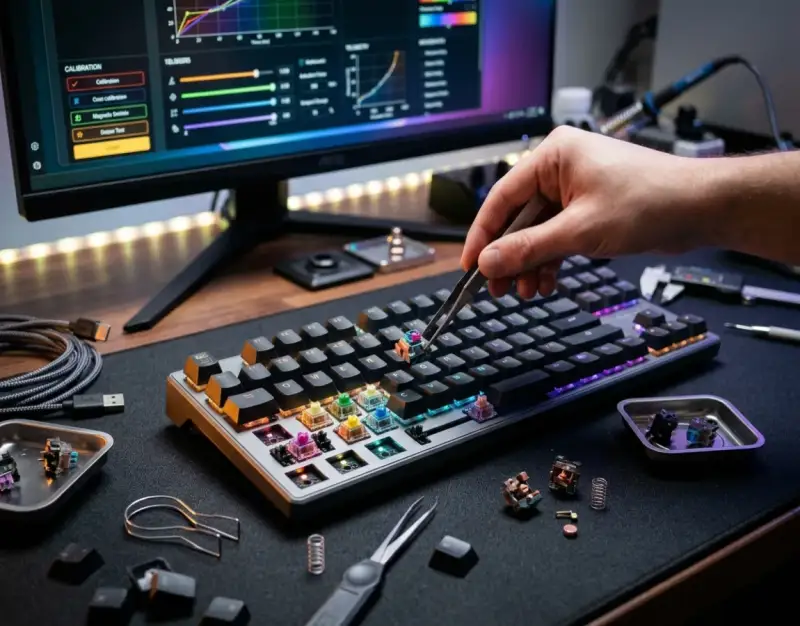
The landscape of competitive PC gaming peripherals has undergone a silent, tectonic shift. For decades, mechanical keyboards were defined by rigid physical architectures—soldered printed circuit boards, static metal leaf springs, and binary mechanical contact points that offered zero room for post-purchase anatomical adaptation. Gamers chose between linear, tactile, or clicky switches and lived with the immutable consequences of that choice. If a switch actuation force felt too heavy during rapid strafing, or if the reset point caused missed double-taps, the only remedy was unbuilding the entire keyboard, desoldering switches, and starting from scratch.
Today, that era of hardware inflexibility is officially over. The convergence of modular engineering and Hall-effect sensor technology has birthed a new echelon of input devices: modular gaming keyboards built around magnetic switches and infinitely adjustable actuation force. Much like enthusiasts optimize thermal performance by evaluating hardware configurations akin to those found in Open-Air Benchtable Builds: Testing Maximum Thermal Dissipation for Extreme Overclocking, modern gamers and peripheral modders now demand granular, real-time telemetry from every single keypress. These devices do not merely register keystrokes; they measure physical displacement down to the fraction of a millimeter, transforming a static input tool into a dynamic, software-calibrated instrument of competitive precision.
This comprehensive investigation dives deep into the engineering principles, physical mechanics, practical deployment strategies, and comparative metrics of modern magnetic-switch gaming boards. By examining how adjustable actuation interacts with advanced software loops—similar to how modern gaming algorithms adapt through Dynamic Difficulty Adjustment with AI: Are Modern Games Getting Too Smart for Their Own Good?—we uncover how millisecond advantages are won and lost at the physical switch level. Whether you are an esports competitor chasing sub-10ms input latencies or a hardware enthusiast looking to build the ultimate modular battle station, understanding these systems is no longer optional; it is the baseline for modern mastery.
Foundational Principles & Mechanics of Magnetic Switches
To truly master the ecosystem of modular keyboards, one must move past marketing buzzwords and examine the underlying physics governing Hall-effect switches. Traditional mechanical keyboards rely on physical metal leaves coming into contact with one another. When pressed, the leaves touch, completing an electrical circuit that registers the key. This physical friction introduces mechanical wear, switch bounce (chatter), and a fixed actuation point typically set at 2.0mm along a standard 4.0mm total travel distance.
The Physics of Hall-Effect Sensors
Magnetic switches eliminate physical metal contact entirely. Instead, each individual keystem houses a permanent neodymium magnet. Positioned directly beneath the stem on the printed circuit board is a Hall-effect sensor, a solid-state transducer that varies its output voltage in response to a magnetic field. As the key is pressed downward, the magnet moves closer to the sensor, increasing the magnetic flux density. The sensor reads this changing magnetic field and translates it into an analog voltage signal, which the onboard microcontroller unit (MCU) converts into digital data.
Because there is no physical friction between moving electrical contacts, Hall-effect switches boast an astronomical operational lifespan—frequently rated for 100 million keystrokes or more, virtually eliminating switch degradation and electrical chatter. Furthermore, because the sensor reads continuous magnetic flux rather than a binary on/off state, the exact depth at which a keystroke registers is entirely software-defined.
Adjustable Actuation Force and Rapid Trigger Technology
The true paradigm shift unlocked by magnetic switches is the ability to customize actuation and reset points on a per-key basis. Users can configure a W key to actuate at a hyper-sensitive 0.1mm for instantaneous movement initiation, while setting heavier modifier keys (like Shift or Ctrl) to 3.0mm to prevent accidental misfires during high-intensity engagements.
Building upon adjustable actuation is Rapid Trigger (sometimes called dynamic rapid trigger). In traditional setups, a key must travel all the way back past its fixed reset point before it can be registered as pressed again. Rapid Trigger dynamically changes this: the moment the physical key begins to travel upward (reversing direction), the keystroke is instantly deactivated. This allows for instantaneous counter-strafing in tactical shooters, eliminating the dead zone inherent in mechanical switches and granting players superhuman input responsiveness.
Hardware Modularity: Building and Customizing the Chassis
While the switch mechanism forms the beating heart of these modern peripherals, the modular physical architecture dictates long-term durability, acoustics, and tactile feedback. A truly modular gaming keyboard is not just about swapping switches; it encompasses hot-swappable PCBs, gasket-mount isolation systems, plate materials, and weight distribution tunings that mirror the meticulous calibration seen in precision Spatial Computing Hand Tracking Accuracy: Optical vs Glove-Based Sensor Arrays where every physical millimeter directly impacts output fidelity.
Hot-Swappable PCBs and Switch Compatibility
Unlike traditional boards where switches are soldered directly to traces, modular keyboards utilize hot-swap sockets. In magnetic switch ecosystems, socket compatibility is strictly governed by pin layouts and sensor alignment. Because Hall-effect switches require specific magnetic orientations, users cannot simply mix standard mechanical MX-style switches into a magnetic PCB. However, manufacturers now offer varied magnetic switch variants—ranging from ultra-light linear switches to heavier, dampened options—allowing users to tune the bottom-out feel and acoustic profile without altering the digital actuation parameters.
Acoustic Dampening and Gasket-Mount Integration
Acoustic engineering plays a massive role in the modern keyboard enthusiast community. Modular designs incorporate multi-layer dampening structures, including silicone base pours, Poron switch pads, and IXPE sheet layers that absorb high-frequency ping and amplify deep, thocky sound profiles. Gasket-mount plates—where the internal switch plate floats on rubber elastomers rather than screwing rigidly into the top and bottom case—provide a flex-friendly typing experience that cushions bottom-out impacts, drastically reducing finger fatigue during extended gaming sessions.
Step-by-Step Calibration and Software Tuning
Owning a magnetic switch keyboard without properly configuring its software suite is like buying a high-performance sports car and never shifting out of first gear. Achieving optimal performance requires a methodical approach to calibration, dead-zone testing, and profile management across different game genres.
Step 1: Baseline Calibration and Magnetic Nulling
Before adjusting actuation points, you must perform a factory calibration or magnetic nulling sequence. Ensure the keyboard rests on a flat, vibration-free surface away from external magnetic fields (such as large speakers or external power bricks). Open the manufacturer’s proprietary software (or open-source alternatives like Vial/QMK forks supporting Hall-effect chips) and initiate the sensor baseline calibration tool. This process maps the resting voltage of every individual switch, compensating for microscopic manufacturing tolerances in magnet strength and sensor sensitivity.
Step 2: Mapping Custom Actuation Profiles per Genre
Different game genres demand entirely different input characteristics. Create distinct software profiles for tactical shooters, rhythm games, and MMORPGs:
- Tactical Shooters (e.g., Valorant, CS2): Set WASD and primary weapon slots to an ultra-shallow 0.2mm actuation with Rapid Trigger enabled at 0.1mm sensitivity. This guarantees zero latency during emergency peek-and-shoot maneuvers.
- Rhythm Games (e.g., Osu!, Sound Voltex): Configure home row keys with a 0.4mm actuation and firm spring resistance to prevent accidental actuation while maintaining blistering note-hit speeds.
- Productivity & Writing: Program a secondary profile with a deeper 2.0mm actuation force. This prevents accidental typos caused by resting your fingers lightly on the home row.
Step 3: Testing and Fine-Tuning via Input Visualizers
Utilize built-in software input visualizers or third-party polling rate testers to verify your configurations. Press keys slowly while watching the real-time actuation graph. If a key registers chatter or double-acts without full intentional pressure, increase its dead-zone threshold by 0.05mm increments until the signal stabilizes perfectly.
Advanced Ergonomics and Physical Modding Techniques
Hardware customization extends far beyond software toggles. Achieving peak performance requires physical optimization of the keyboard's chassis, keycap profiles, and wrist alignment.
Keycap Mass and Material Selection
The weight and profile of your keycaps directly influence the return speed and acoustic resonance of magnetic switches. Thick PBT (Polybutylene Terephthalate) keycaps resist shine and offer a deeper sound profile, while lighter ABS keycaps reduce the total moving mass, allowing the magnetic stem to return upward more rapidly under spring tension. When pairing light keycaps with aggressive Rapid Trigger settings, the physical recovery time drops to absolute minimums, maximizing recovery speed during rapid finger lifts.
Case Weight and Desk Stability
Competitive gaming involves aggressive, high-speed keystrokes and rapid hand movements. Lightweight plastic chassis tend to flex and slide across desk mats during frantic clutch moments. Upgrading to an anodized aluminum or brass weight-weighted modular chassis ensures the keyboard remains completely anchored. A stable foundation guarantees that the force applied by your fingers is 100% translated into switch compression rather than absorbing energy via chassis flex.
Real-World Case Studies & Scenarios
To understand the practical impact of modular magnetic keyboards, let us examine two contrasting case studies from competitive gaming environments.
Case Study A: The Esport Competitor (Success Scenario)
A professional regional *Valorant* competitor struggled with inconsistent counter-strafing dead zones using traditional optical-mechanical keyboards. By transitioning to a modular magnetic board with Rapid Trigger configured to 0.1mm on movement keys, the player recorded a measurable 14-millisecond reduction in time-to-stop metrics. Over a 50-game sample size, peek success percentages increased by 8.5%. The ability to fine-tune actuation on the fly eliminated accidental movement registry while holding tight angles, proving that hardware-level analog control directly translates into competitive advantages.
Case Study B: The Uncalibrated Failure (Common Pitfall)
An amateur rhythm game enthusiast purchased a high-end magnetic keyboard but skipped the initial software calibration phase, leaving factory presets intact while aggressively enabling maximum sensitivity across all keys. Because manufacturing variances in magnet placement were never null-calibrated, three keys near the perimeter of the PCB exhibited false-triggering due to ambient desk vibrations and slight magnetic drift. The player experienced erratic input failures during tournament play, resulting in missed notes and frustration. The lesson is unequivocal: high-tech hardware demands rigorous initial setup and calibration.
Critical Mistakes & How to Avoid Them
Navigating the advanced world of modular magnetic keyboards comes with hidden pitfalls. Avoiding these five critical mistakes will save your investment and ensure peak operational reliability.
- Ignoring Factory Calibration: Failing to run the initial sensor calibration tool leads to uneven actuation points and phantom inputs. Countermeasure: Always run full calibration upon initial firmware updates or after disassembling the board.
- Exposing the Board to Magnetic Fields: Placing strong neodymium magnets, magnetic charging cables, or unshielded speakers near the keyboard disrupts Hall-effect sensor accuracy. Countermeasure: Maintain a clear desk perimeter free of foreign magnetic sources.
- Over-Lubricating Magnetic Stems: Applying thick dielectric grease or excessive lube to switch stems can migrate down onto the PCB sensors, dampening magnetic flux readings. Countermeasure: Use ultra-thin synthetic oils sparingly and only on friction points, never directly above sensor wells.
- Setting Sensitivity Too Aggressive for Daily Use: Running 0.1mm actuation on all typing keys causes catastrophic accidental keystrokes during general productivity tasks. Countermeasure: Establish separate gaming and typing profiles and switch between them dynamically.
- Neglecting Firmware Updates: Hall-effect performance relies heavily on underlying MCU firmware algorithms that handle dynamic rapid trigger math. Countermeasure: Regularly check manufacturer support portals for firmware patches that optimize sensor polling stability.
Comprehensive Performance Comparison Table
To evaluate how modular magnetic setups stack up against legacy switch technologies, review the comprehensive performance metrics below:
| Switch Technology | Actuation Customization | Lifespan (Keystrokes) | Rapid Trigger Support | Mechanical Wear & Chatter |
|---|---|---|---|---|
| Traditional Mechanical (MX) | Fixed (Requires soldering/switches swap) | 50M – 80M | No | High (Contact leaf degradation) |
| Optical-Mechanical | Fixed (Light beam interruption) | 100M+ | Limited (Fixed reset) | Low (Optical sensor longevity) |
| Modular Magnetic (Hall-Effect) | Infinite (Per-key software adjustable) | 100M+ | Yes (Dynamic sub-millimeter) | Zero (Non-contact magnetic sensing) |
Frequently Asked Questions (FAQ)
Can I put standard mechanical switches into a magnetic switch keyboard?
No. Standard mechanical switches rely on physical metal pins that close an electrical circuit, whereas magnetic switches depend on an embedded neodymium magnet interacting with a Hall-effect sensor on the PCB. Installing a standard mechanical switch into a magnetic socket will result in zero electrical recognition or signal transmission.
Does adjustable actuation force drain more battery on wireless magnetic boards?
Yes, slightly. Because Hall-effect sensors require continuous analog voltage monitoring rather than waiting for a passive digital switch closure, wireless magnetic keyboards consume more standby battery power than traditional mechanical boards. However, manufacturers mitigate this with advanced sleep states and high-capacity internal lithium batteries.
What is Rapid Trigger, and do I really need it for casual gaming?
Rapid Trigger eliminates the physical reset dead zone of a switch by instantly deactivating the input the moment the key travels upward. While essential for competitive esports athletes seeking microsecond advantages in tactical shooters, casual gamers playing RPGs or strategy titles will see minimal tangible benefit from the technology.
How often should I recalibrate my magnetic keyboard?
You should perform a baseline sensor calibration out of the box, after any major firmware update, and whenever you notice anomalous key registration or drift. Under normal stable operating conditions, once-per-year recalibration is more than sufficient to maintain absolute precision.
Strategic Roadmap & Final Takeaway
The evolution of modular gaming keyboards powered by magnetic switches and adjustable actuation represents a watershed moment in hardware engineering. By untethering input registration from physical metal contact, the industry has transitioned into an era where keyboards are fully malleable, software-defined instruments tailored to the exact physiological nuances of the user.
Looking ahead over the next 2 to 5 years, expect to see open-source firmware adoption expand rapidly, bringing advanced Hall-effect telemetry to ultra-compact 60% and 40% ergonomic layouts. Furthermore, machine learning integration will likely automate actuation profiling, allowing keyboards to dynamically adjust sensitivity in real-time based on the specific game being played or the user's current typing fatigue levels.
Your immediate next step is clear: audit your current peripheral setup. If you are serious about competitive gaming or ergonomic optimization, invest in a quality modular magnetic chassis, commit the time to master its calibration software, and experience the undeniable edge of sub-millimeter actuation precision.
Be the first to share a gentle reflection on this story.